Scaling AI development on a large codebase is less about the model and more about your process. Treat the LLM not as a magic black box but as a brilliant, over-confident junior developer: to get good work out of it you need a disciplined workflow, tight communication, and a real quality assurance process.
Here is a practical guide to that workflow, from first alignment through to the final quality pass.
The Three-Phase AI Development Workflow
Adopt a disciplined Research → Plan → Implement workflow. This structured process prevents the LLM from going off-track and gives you key checkpoints for human review.
Research Phase
Before writing any code, instruct the LLM to analyze your existing codebase. Ask it to identify key patterns, architectural decisions, and dependencies. For example, in Claude Code, you can use /init that will generate an overview of your project. But for better results, try to point at specific folders and other repositories for the LLM to make connections and have a better picture.
Init the project first: /init in Claude (it will create a CLAUDE.md file)
Then:
Analyze how the login feature works. It communicates with the rate limiter service at `/path/to/rate-limit-service`
Its deployment code is at `/path/to/cicd`
Planning Phase
Use the LLM to write a detailed technical specification or plan. This is a crucial step for managing complexity.
- Don't allow the LLM to start implementing until you get a satisfactory answer. Some LLMs have a "Read-only" mode. Brainstorm with it until you're satisfied with the direction.
- Ask the LLM for clarification, "Ask me clarifying questions about this feature before you start writing the plan." This forces it to verify its assumptions and can prevent major misinterpretations and avoid it going in the wrong direction.
The real goal of this phase is not the document, it is a shared understanding. Aim to reach the same mental picture as the model before it writes anything, the way two engineers align before splitting up the work. Let it interview you one question at a time, offering its recommended answer to each, until the open decisions are settled. Those questions surface choices the original request never mentioned, like whether a new points system should apply retroactively to old records, and those are exactly the decisions you have to agree on to build the thing correctly. Once you are aligned, the plan is only a summary of that shared picture, so do not over-invest in polishing or re-reading it. And do not treat the spec as the only artifact: keep a handle on the code itself, because the code, not the document, is where the work actually lands.
Here's what it would look like:
Help me to implement [your feature] for the [your service] service.
Ask me any questions before it gets started for anything that's not concrete and specific enough in the plan.
Don't start implementing until we agree to start.
Implementation Phase
Work in small, atomic chunks. Avoid giving the LLM massive, multi-faceted tasks. Break down a feature or bug fix into smaller, isolated sub-tasks. This keeps the context window manageable and makes it easier to catch and correct mistakes.
If you're using Claude, a great guide on using the plan mode is working with Claude Code.
Slice work vertically, not layer by layer
When you break a feature into chunks, cut them vertically, not by layer. Left alone, an AI agent tends to build horizontally: all of the database schema first, then all of the API, then the interface. The catch is feedback timing. Nothing is testable end to end until the last layer lands, so the agent codes blind through everything before it. Slice the other way instead: a thin path that touches the schema, a service, and a minimal piece of the interface, so each slice runs and can be tested on its own.
This is the tracer bullet idea from The Pragmatic Programmer. A tracer round glows in flight so you can see where your shots are landing and correct your aim, instead of firing into the dark. A vertical slice does the same for a feature: it is a first complete path, thin but real, that tells you whether you are aimed at the target before you invest in thickening it. A first slice that only builds the service is still horizontal and gives you no integrated feedback.
Context Management Strategies
The context window is a key constraint when working with LLMs. You must actively manage it to get reliable results.
Keep the Session in the Smart Zone
An LLM does its best work at the start of a session, when its context is nearly empty, and gets measurably worse as the context fills. One useful mental model calls the early state the smart zone and the degraded state the dumb zone.
In practice the smart zone runs to roughly 100,000 tokens. Past that, quality falls off: the model hallucinates more and the code stops being good. That boundary sits far below the advertised window and barely moves when the window grows. A model sold on a 1-million-token context does not reason well at 1 million. The extra room mostly buys retrieval, the ability to find a fact buried in a huge context, and not the ability to reason about code. Advertised context is not usable context.
Provide Rich Context
Use code and documentation as context. LLMs can (and will) hallucinate without it. Provide the LLM with relevant code snippets, design documents, and API documentation. This gives it the specific, structured information it needs to produce accurate code.
Some MCP servers like Context7 can be connected to your favorite LLM. Set it up and ask your LLM to look it up when planning.
More and more documentation provide llm.txt docs. Look for it and paste it inside your LLM. More and more websites expose the /llms.txt endpoint. For example Stripe or Cloudflare.
If there is no friendly LLM version yet, use tools like gitingest.com for repositories or llm.codes for Apple documentation.
Be careful on Context Management
The context window is a key constraint. Use tools that can automatically summarize conversation history or manually manage context by storing important information in markdown files. Store important context in markdown files that persist across sessions. or Use git commit messages as context storage.
Most of the time, after a brainstorming session, your context will already be bloated. It's good to restart a fresh session then read the plan file you've created.
Treat the context window as a budget, not a container. A container is something you fill to the top; a budget is something you spend deliberately, because it runs out. You get roughly 100,000 good tokens per session (check the balance with /context), and every single thing you load draws it down: the system prompt, your CLAUDE.md, every MCP tool definition, every file the agent reads, the output of every command it runs, and the whole back-and-forth of the conversation itself. None of that is free, and most of it was never planned for.
So spend the budget on the task and nothing else. Do not let the agent wander the repo reading files on the off chance they matter, and do not keep a tool loaded that this task will never call. When the budget is gone it does not refill: bank the result by writing the plan or the current state to a file, restart, and open a fresh budget. That is cheaper than reading a diff you no longer trust.
Note what this rules out. A rule expressed as a percentage of the window is not a budget at all, because it is measured against a number the vendor chose rather than against the work. Such a rule tightens or loosens every time a model ships a bigger context, which is exactly backwards: the point where quality drops barely moves. Count tokens, not percentages.
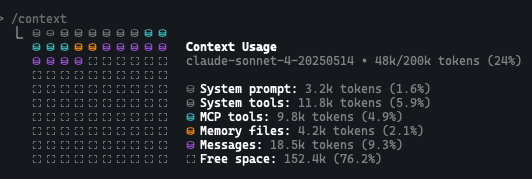
Prefer clearing the context over compacting it. When you clear, the session returns to the same known clean state every time. Auto-compaction (/compact in Claude) instead summarizes blindly: you cannot see what it dropped, and it leaves residue behind that quietly nudges you toward the dumb zone. It is better to start fresh from a new session and read back the markdown files you created than to auto-compact and hope the right things survived.
This is how I do it:
Before implementing, write down in `plan.md`:

1. **Architecture Plan** - tech stack, key decisions, and why
2. **Structured Todo List**
   Break down the implementation into the smallest atomic units that allow it to run without input
   - Phase 1: ...
   - Phase 2: ...
When starting the implementation:
Read `plan.md` and start implementing phase [x]. Make sure to add Session Recovery Notes.
   Including detailed notes about:
   - Current project state and what's been completed
   - Any critical decisions made so far
   - Where to resume if this session crashes
Effective AI Communication
Think of yourself as a strong manager for your AI assistant. The clearer your instructions, the better the output will be.
Be a Good Manager for your AI
Think of yourself as managing a junior engineer. Provide clear, unambiguous instructions. Use strong, imperative language like "must," "critical," and "never" to set clear guardrails. Be specific about the desired behavior of the code, not the implementation details.
Encourage Questioning and have multiple options
A powerful technique is to instruct the LLM to ask clarifying questions before it starts generating code. This forces it to verify its assumptions and can prevent it from misinterpreting your intent. Sometimes (or most of the time) you also won't agree with the plan. Ask for multiple options:
Give me multiple options on how to solve the problem.

Ask me any questions before it gets started for anything that's not concrete and specific enough in the plan.
Quality Assurance Framework
Leverage Automation to Enforce Quality
Don't skip code reviews. Instead, change what you review. Use automated tools like pre-commit hooks, linters, and test suites to verify the LLM's output. The LLM can even be instructed to run these checks itself and fix any errors or check the tests.
At each phase implementation, call the `lint` and `compile` and `test` commands
Let Feedback Loops Set the Ceiling
The quality of your automated checks is the ceiling on the quality of the agent's code. An agent with a solid test suite, type checks, and a linter can see whether its change is correct and fix it; an agent without them is guessing. So when the output disappoints, the fix is usually to strengthen the feedback loops, not to rewrite the prompt. Test-driven development gives the tightest loop of all: have the agent write a failing test first, watch it fail, then make it pass. This also curbs a common bad habit, where an agent writes all the code and then writes tests that simply rubber-stamp whatever it already produced. A test committed to before the code exists is much harder to fake. Codebase structure feeds this too, since modules with small interfaces and substantial internals are easier to wrap a single meaningful test around, which is one more reason clean code for AI agents pays off.
Review in a Fresh Session
If the agent implements and reviews in the same conversation, the review happens late in a full context window, in the dumb zone, so it is weaker than the work it is judging. Clear the context, or start a new session, before reviewing, so the reviewer runs in the smart zone. A common setup goes further and uses a cheaper model to implement and a stronger one to review, since the review is where the harder judgment is needed.
Human Oversight
Always verify the LLM's work, especially in critical sections of the codebase. Be skeptical of "it compiles and runs" without functional testing.
Final Quality Pass
Clean up generated code in a final pass once functionality works. This ensures it adheres to team standards for readability and maintainability. The cleaner your codebase stays, the fewer rounds the next task takes: see clean code for AI agents for why codebase quality is the biggest lever on agent output.
Hand Off Implementation to an Unattended Loop
Not every task needs you watching. It helps to split work into two kinds: human-in-the-loop tasks, where a person has to sit and decide, and AFK (away-from-keyboard) tasks, where an agent can run unattended. Alignment and planning are firmly human-in-the-loop. Well-specified implementation, by contrast, can be handed off. Think of it as a day shift and a night shift: you plan during the day and queue the work, then let agents implement it while you are away.
The unattended part is a loop. Give the agent the backlog and the recent commits, have it pick the next unblocked task, implement it with tests, run the feedback loops, commit, and repeat until the backlog is empty. This works best when the plan is a set of independently grabbable issues with explicit blocking relationships, rather than a single numbered sequence. A numbered sequence can only be worked by one agent; a graph of issues lets several agents each grab an unblocked one and work in parallel, each in its own isolated branch or sandbox, with a later step merging the results. Your QA of the finished work then generates new issues that go back onto the board, so the loop keeps feeding itself.
A word of caution on the artifacts this produces. A plan or requirements document left in the repo after the code has moved on becomes a trap: a future agent will find it, treat it as current, and build on stale requirements. This is documentation rot. Close or delete finished planning documents so no agent mistakes them for the present state of the system.
Running work unattended is one rung on a longer ladder. The AI adoption stages model describes what changes as you go from one supervised agent to many, and what gates each step: the answer is almost always trust and verification rather than the model.
Implementation Guidelines
Start Small, Scale Up
Start with smaller features to build confidence in your process. Test your workflow on non-critical components first, then gradually increase complexity as you refine your approach.